Protection, scan, update, and license status at a glance
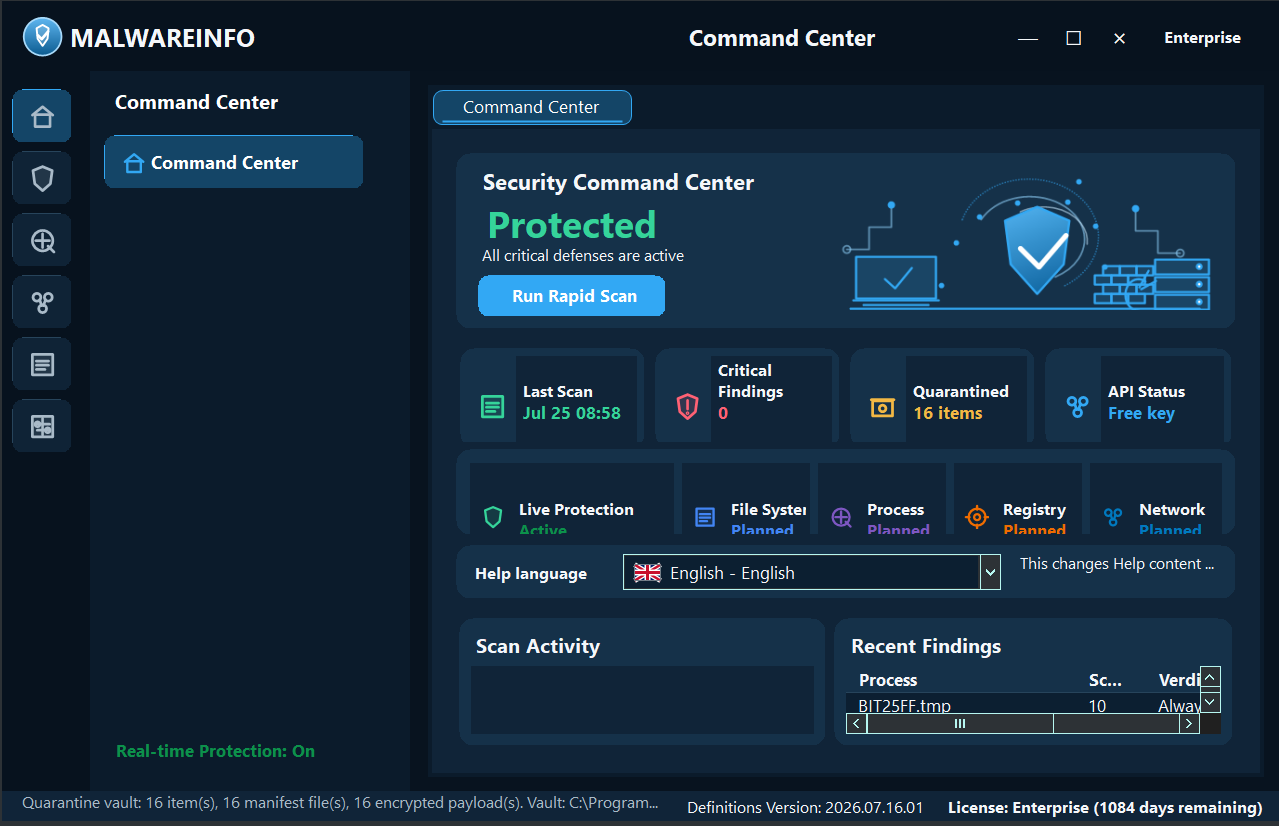
Review the current protection state, recent activity, product and signature status, edition access, and the next investigation workspace from one starting point.
Windows malware analysis workstation
Malware INFO is a local-first security and incident-analysis application for reputation lookup, Threat Lookup, Rapid Scan, Deep Signature Scan, Zero-Day Analysis, Protection Matrix, Quarantine Vault, Ransomware Shield, Security Connectors, Startup & Persistence Manager, selected-process memory recovery, API/DLL Trace workflows, and verified technical and executive reporting.
Public release
The public Free download is coming soon. Professional and Enterprise licenses are activated through the customer Portal.
Clear positioning
Malware INFO complements antivirus, EDR, XDR, and SIEM platforms. It is designed for fast internal incident response when those platforms do not expose enough detail about a file, process, persistence artifact, or memory region. It does not replace an organization's existing endpoint protection.
The product turns deep evidence into a guided workflow so a user with foundational cybersecurity knowledge can investigate and respond more effectively. The stronger the operator's knowledge and judgment, the more value Malware INFO can provide; the software supports, but never replaces, human decisions.
Working files, memory captures, Live Protection history, and API Trace evidence do not need to be copied to a Malware INFO analysis cloud. Network actions remain explicit and tied to the feature the analyst chooses.
Company and accountability
Established in 2017, United Info-Sec is a Myanmar cybersecurity and total IT solutions company. Its stated work includes cybersecurity services, IT infrastructure support, secure digital services, and cybersecurity knowledge and awareness.
A public Myanmar International TV report dated 2 September 2022 records a meeting between officials from United Info-Sec and the Union Minister for Information, including a presentation concerning the MTube video-sharing and live-streaming platform.
Current product
The in-app Help covers every area below. Availability depends on edition, Windows access, target eligibility, provider rights, and the quality of available evidence.
Review the current protection state, recent activity, product and signature status, edition access, and the next investigation workspace from one starting point.
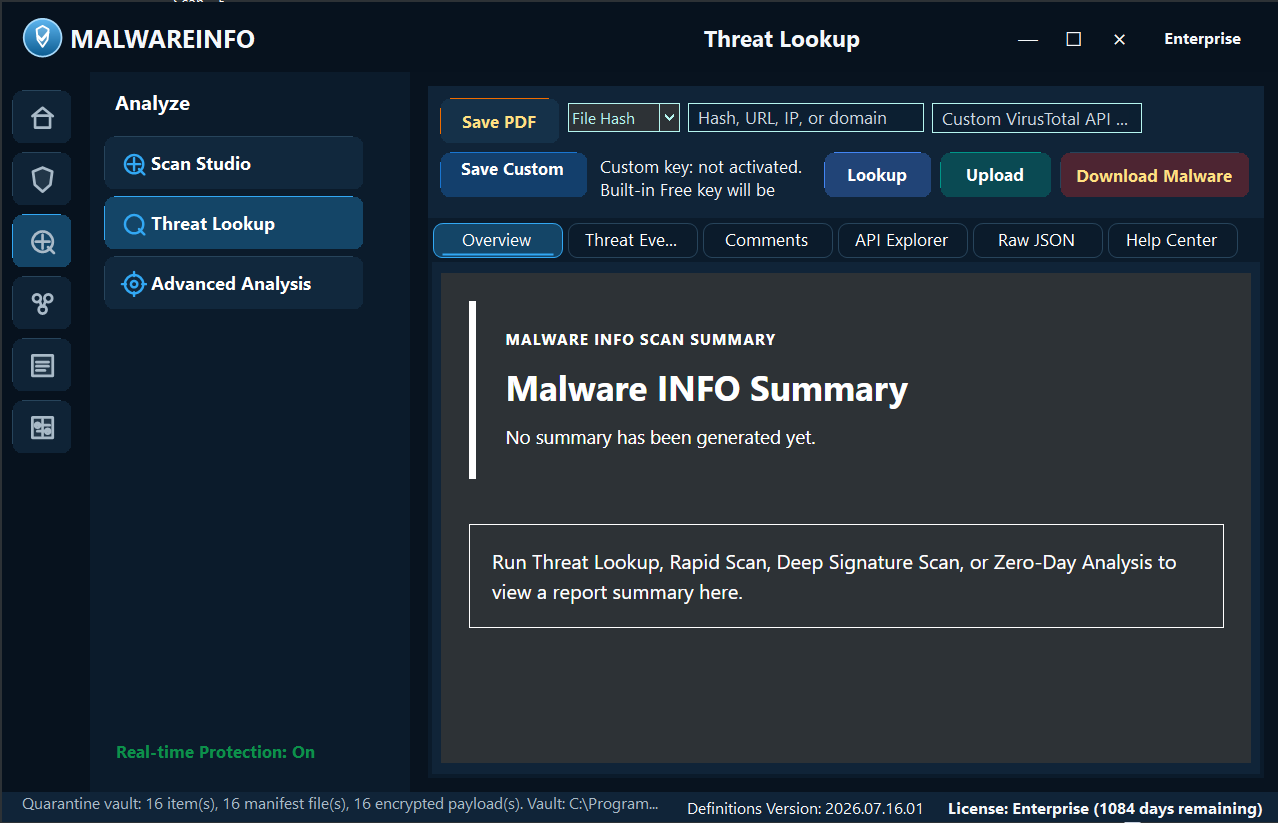
Review summary, detections, comments, relationships, pivots, raw JSON, and license-aware VirusTotal API Explorer workflows.
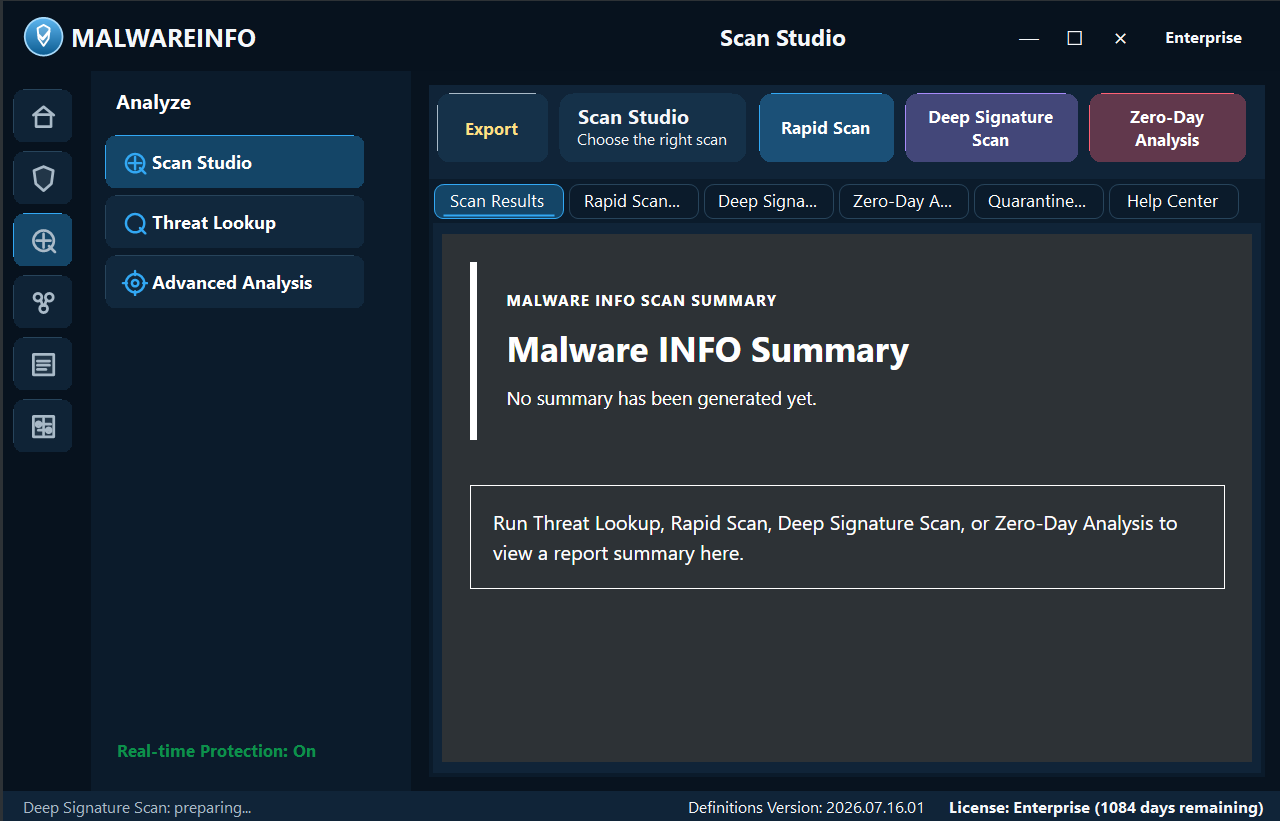
Combine known-bad hashes, signature rules, YARA, custom scopes, memory paths, persistence review, and analyst-controlled quarantine.
Score suspicious process, command-line, persistence, network, trust, and PE context without treating heuristic evidence as automatic proof.
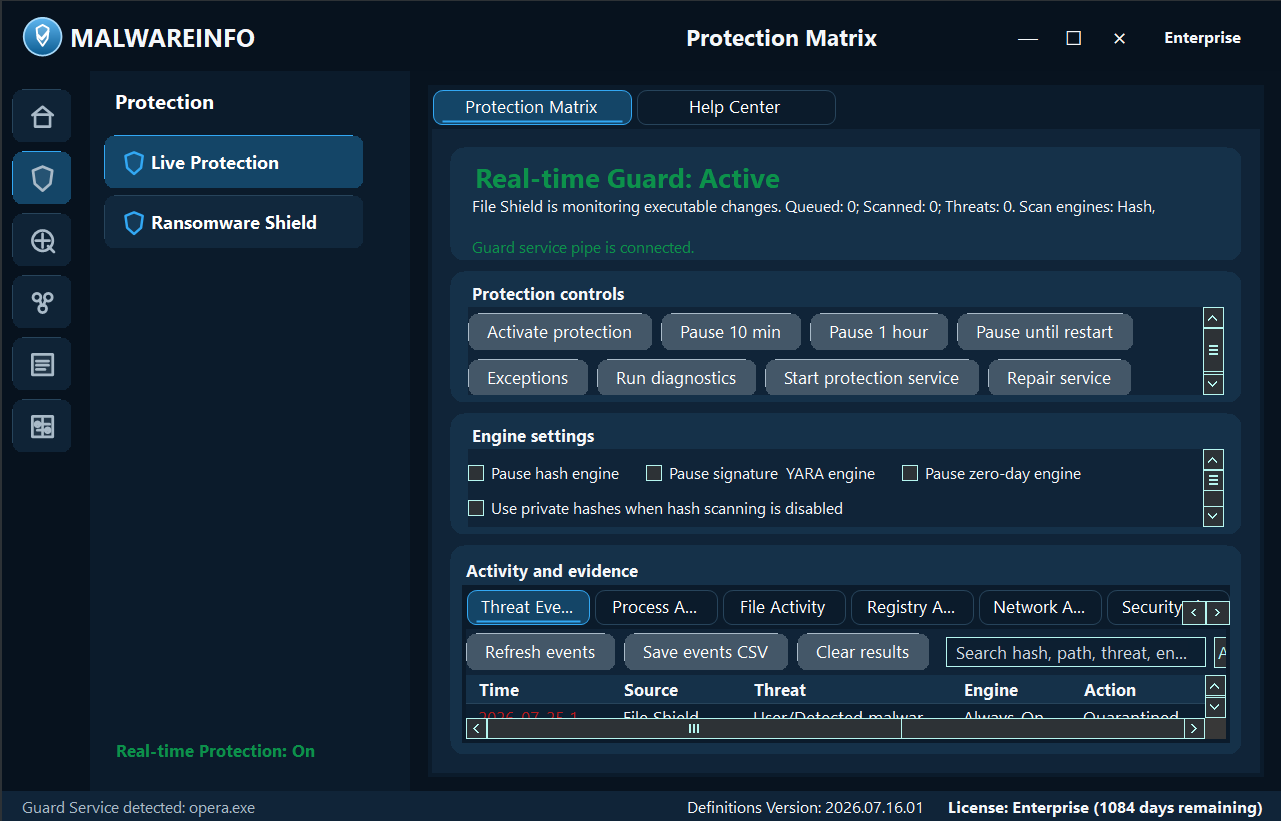
Use the background Guard Service, visible engine state, focused monitor tabs, incident timelines, live executable-memory transitions, and analyst-controlled evidence capture.
Hunt with query templates, read trusted-source news, prioritize NVD/CISA KEV/FIRST EPSS evidence, save items, and export reader views.
Normalize approved licensed-provider claims without direct onion crawling. Provider licensing, quotas, attribution, and retention remain the organization’s responsibility.
Preserve original path, SHA-256, source, timestamps, and status. Keep containment separate from permanent deletion and review exceptions carefully.
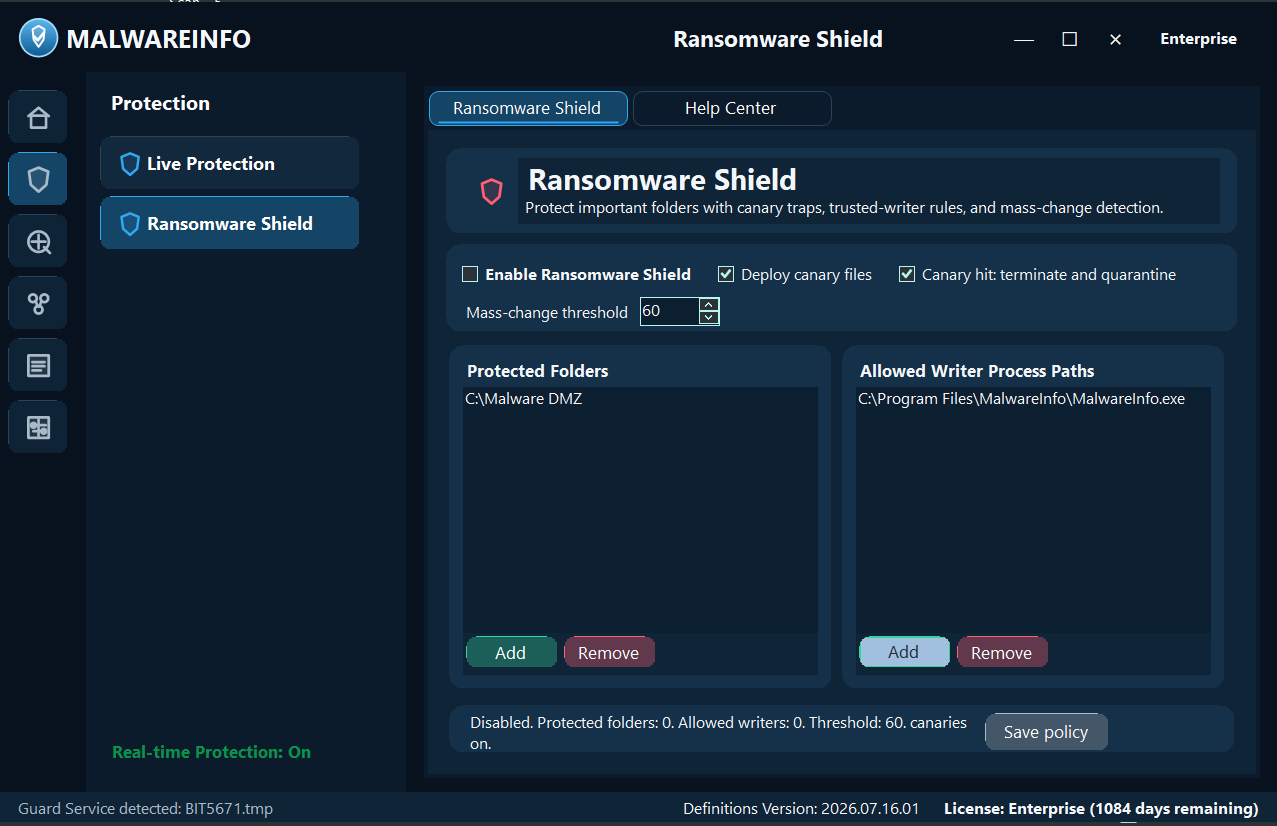
Protect selected folders with canary files, exact allowed-writer paths, mass-change thresholds, attributed response, logs, and safe verification steps.
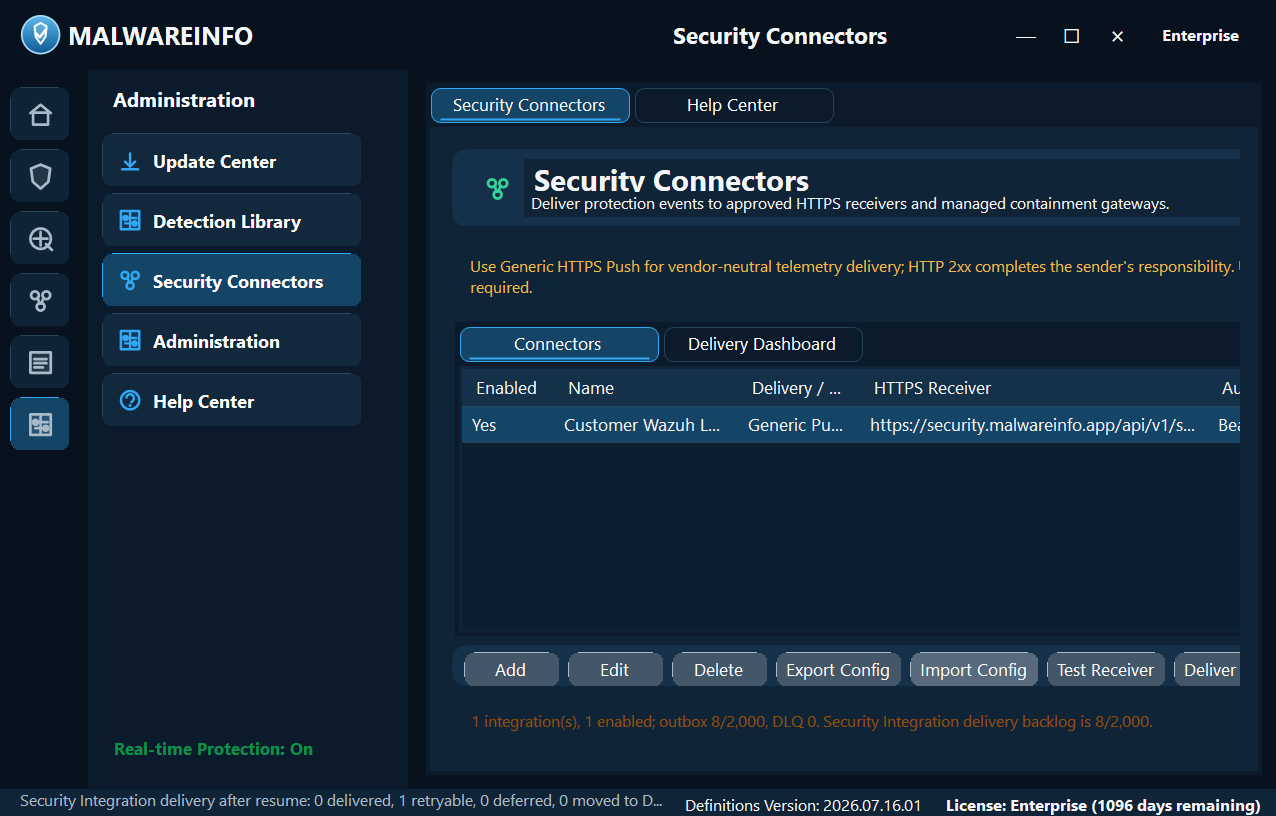
Send normalized, authorized threat events and approved containment requests to organization-controlled HTTPS SIEM, XDR, SOAR, firewall, IDS/IPS, or integration gateways.
Inventory Registry Run/RunOnce entries, Startup Folder items, and executable Scheduled Tasks; remove or disable selected persistence with a transaction-backed restore journal.
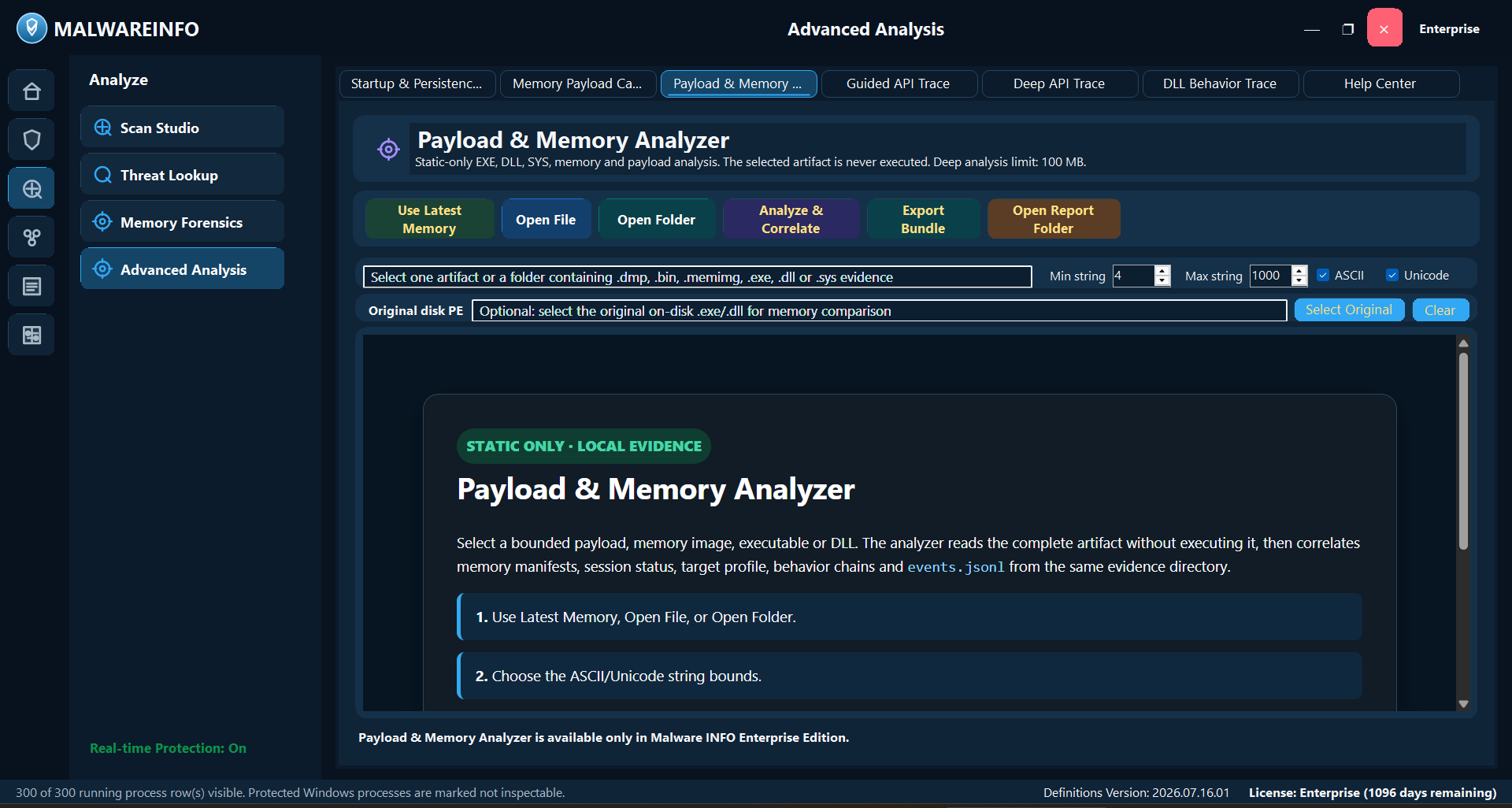
Recover bounded executable-memory evidence from one selected process, then correlate static PE/raw-memory findings, strings, bounded HEX, and matching session evidence in a local HTML report.
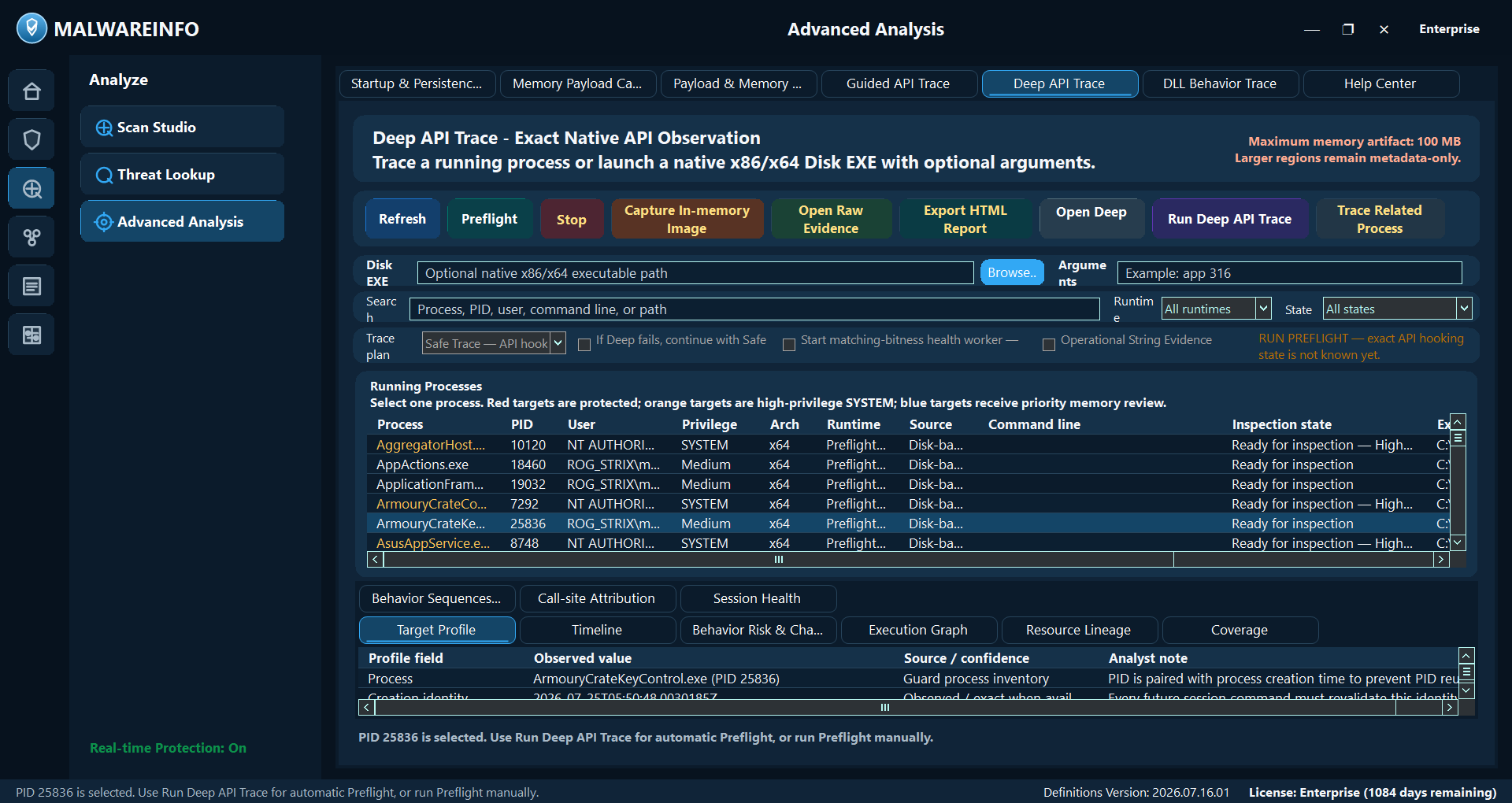
Capture selected-process timelines, supported parameters and return values, memory snapshots, behavior chains, diagnostics, verified ZIP evidence, and an offline Final Report.
Validate supported evidence packages from API Trace, Live Protection, and Payload & Memory Analyzer, correlate independent evidence, require analyst approval, and export a redacted offline HTML/PDF executive report with hashes, evidence links, contradictions, and collection gaps. It does not scan, contain, upload evidence, or make an automatic malware verdict.
Preflight a native x86/x64 DLL without loading it, then use an explicit matching-bitness controlled host for an approved export, supported exact API evidence, memory capture, diagnostics, and verified HTML/ZIP reporting in an isolated lab.
Import, validate, clean, and organize rules; build encrypted private hash/signature/YARA packages; and separate normal database work from Enterprise distribution.
Separate final evidence from operational diagnostics, stage program and public-signature updates, use Enterprise-controlled local detection packages, and protect Enterprise UI access.
Version 1.2.1 can show this workspace and its Help guide, but public analysis is not generally available. No real Windows build or production memory-image format is currently claimed as supported; this is distinct from the available live Memory Payload Capture workflow.
Current interface
Public release
Public release
Malware INFO is not publicly released yet. When the Free installer is ready, this page will publish the official download, SHA-256 hash, release notes, and safe-use guidance. Professional and Enterprise customers will receive license-checked updates from inside Malware INFO.
Simple licensing
Prices are shown in USD. First choose how the license will be used, then select the edition, device quantity, and one-, two-, or three-year term.
Purchase purpose
Personal purchases are for one person on one device, with a one-, two-, or three-year term.
$0no license required
$301 device / 1 year
$501 device / 1 year
Quantity and pricing policy
Published volume policy: Organization 50/100 pricing uses 35%/40% savings from the single-device list total. Reseller 50/100 pricing uses 45%/50% savings. Reseller inventory remains restricted to separate end customers. A reseller must use a reseller-only email account; an account that already has customer entitlements, registered Machine Hash values, or device licenses cannot later be approved as a reseller.
Complete published pricing
These are final displayed totals for the current catalog. Only quantities above 200 devices require a custom quote.
| Edition | Purpose | Devices | 1 year | 2 years | 3 years |
|---|---|---|---|---|---|
| Professional | Personal | 1 | $30 | $53 | $72 |
| Professional | Organization | 3 | $78 | $137 | $187 |
| Professional | Organization | 10 | $225 | $394 | $540 |
| Professional | Organization | 50 | $975 | $1,723 | $2,340 |
| Professional | Organization | 100 | $1,800 | $3,180 | $4,320 |
| Professional | Reseller | 10 | $225 | $394 | $540 |
| Professional | Reseller | 50 | $825 | $1,458 | $1,980 |
| Professional | Reseller | 100 | $1,500 | $2,650 | $3,600 |
| Enterprise | Personal | 1 | $50 | $88 | $120 |
| Enterprise | Organization | 3 | $130 | $228 | $312 |
| Enterprise | Organization | 10 | $375 | $656 | $900 |
| Enterprise | Organization | 50 | $1,625 | $2,860 | $3,900 |
| Enterprise | Organization | 100 | $3,000 | $5,280 | $7,200 |
| Enterprise | Reseller | 10 | $375 | $656 | $900 |
| Enterprise | Reseller | 50 | $1,375 | $2,420 | $3,300 |
| Enterprise | Reseller | 100 | $2,500 | $4,400 | $6,000 |
Current payment options
Confirm purposeChoose Personal, Organization, or Reseller, then confirm edition, quantity, and term.
Choose paymentComplete the purchase using the confirmed USDT or PayPal payment instructions supplied by the Malware INFO team.
Receive the correct keyDirect buyers receive their entitlement Temp Key. Resellers receive inventory that can issue a different customer Temp Key for each sale.
Customer completes licensingOnly the final customer redeems the customer Temp Key, enters the Machine Hash, and receives the device license key.
Edition access
A check means the feature is available in that edition. A dash means it is locked or unavailable. Help Center content is visible across editions so evaluators can understand paid capabilities without bypassing license controls.
Threat Lookup, Rapid Scan, Deep Signature Scan, Quarantine Vault review, Reports & Evidence, Detection Library, Threat Briefing, Vulnerability Alerts, and Help Center.
Everything in Free plus Zero-Day Analysis, Threat Intelligence, licensed connectors, Dark Web Intelligence, custom feeds, Live Protection, and Ransomware Shield.
Everything in Professional plus Administration, private packages, watchlists, App Lock, Security Connectors, Startup & Persistence Manager, selected-process Memory Payload Capture and Payload & Memory Analyzer, and API/DLL trace workflows.
| Feature | Free | Professional | Enterprise |
|---|---|---|---|
| Threat Lookup and reputation review | ✓Yes | ✓Yes | ✓Yes |
| Rapid Scan — known-bad hash evidence | ✓Yes | ✓Yes | ✓Yes |
| Deep Signature Scan — HEX signatures | ✓Yes | ✓Yes | ✓Yes |
| YARA rule scan | ✓Yes | ✓Yes | ✓Yes |
| Quarantine Vault review, restore, delete, export | ✓Yes | ✓Yes | ✓Yes |
| Reports & Evidence | ✓Yes | ✓Yes | ✓Yes |
| Detection Library | ✓Yes | ✓Yes | ✓Yes |
| Tray-only startup and close-to-tray | ✓Yes | ✓Yes | ✓Yes |
| Colored tray shield status icon | ✓Yes | ✓Yes | ✓Yes |
| Custom VirusTotal API key | —No | ✓Yes | ✓Yes |
| Zero-Day Analysis | —No | ✓Yes | ✓Yes |
| Threat Intelligence | —No | ✓Yes | ✓Yes |
| Built-in Intelligence query templates | —No | ✓Yes | ✓Yes |
| Enterprise custom Intelligence query templates | —No | —No | ✓Yes |
| Malware download when account allows it | —No | ✓Yes | ✓Yes |
| API Explorer | —No | ✓Yes | ✓Yes |
| Protection Matrix / Live Protection — File / Registry / Process / Network / Security Timeline | —No | ✓Yes | ✓Yes |
| Threat Briefing reader and PDF export | ✓Yes | ✓Yes | ✓Yes |
| Vulnerability Alerts reader and PDF export | ✓Yes | ✓Yes | ✓Yes |
| Threat Briefing / Vulnerability Alerts Enterprise watchlists | —No | —No | ✓Yes |
| Custom Threat Briefing RSS/Atom feeds | —No | ✓Yes | ✓Yes |
| Organization-owned licensed Threat/CVE API connectors | —No | ✓Yes | ✓Yes |
| Dark Web Intelligence through a licensed provider | —No | ✓Yes | ✓Yes |
| Ransomware Shield | —No | ✓Yes | ✓Yes |
| Security Connectors — SIEM/XDR/SOAR/gateway events | —No | —No | ✓Yes |
| Startup & Persistence Manager — Registry Run, Startup Folder, and Scheduled Task restore-ready cleanup | —No | —No | ✓Yes |
| Payload & Memory Analyzer — static/correlated HTML report | —No | —No | ✓Yes |
| Payload & Memory Analyzer — strings and bounded HEX preview | —No | —No | ✓Yes |
| Memory Payload Capture — bounded executable-memory recovery | —No | —No | ✓Yes |
| Guided / Deep API Trace — parameters and return values | —No | —No | ✓Yes |
| DLL Behavior Trace — controlled native x86/x64 DLL observation | —No | —No | ✓Yes |
| Guided / Deep API Trace — memory snapshots and behavior chains | —No | —No | ✓Yes |
| Guided / Deep API Trace — verified ZIP and offline HTML Final Report | —No | —No | ✓Yes |
| Final Report to CISO | —No | —No | ✓Yes |
| Enterprise App Lock password protection | —No | —No | ✓Yes |
| App Lock tray shield/exit protection | —No | —No | ✓Yes |
| Enterprise license App Lock recovery | —No | —No | ✓Yes |
| Administration workspace and organization-controlled policy | —No | —No | ✓Yes |
| Update Center — program and public-signature update staging | ✓Yes | ✓Yes | ✓Yes |
| Local Update server | —No | —No | ✓Yes |
| Private encrypted hash/signature/YARA packages | —No | —No | ✓Yes |
| Enterprise private Guard engine override options | —No | —No | ✓Yes |
| Offline Windows Memory Forensics — in-development advertisement / Developer preview only | —Not generally available | —Not generally available | —Not generally available |
Recommended workflow
Start with non-invasive context, preserve identity and timing, and move to controlled live analysis only when authorization and an isolated lab are available.
Record the original path, name, size, SHA-256, source, and case context.
Check reputation and relationships when policy permits sharing the indicator.
Use hash, HEX, YARA, memory, persistence, and custom-scope evidence.
Review Zero-Day Analysis signals and Live Protection file, registry, process, network, and memory history.
Quarantine confirmed supported files; treat alert-only findings as review priorities.
Use Payload/API workflows only for an authorized selected process in an isolated environment.
Preserve reports, manifests, checksums, collection gaps, and analyst notes.
Security, privacy, and evidence limits
Evidence stays local unless the user deliberately exports or shares it. VirusTotal lookup sends the selected indicator; a complete file is sent only after the user explicitly chooses Upload to VirusTotal and confirms.
Observed and Allowed do not mean safe. AlertOnly means review is required. Detected means a configured confirmed source matched. Quarantined means supported file containment succeeded.
Malware INFO does not make it safe to execute unknown code on a normal computer. It cannot guarantee interception of every exploit, driver, direct syscall, credential theft, destructive action, or evasion technique.
Guided API Trace is least invasive. Deep API Trace changes timing, may trigger anti-debug behavior, and has target limits. Use it only when exact supported API evidence is necessary and the lab accepts the impact.
An RX/RWX dump proves readable bytes existed at a recorded time. Correlate identity, protection changes, writer/thread origin, timeline, signer, network, file, and persistence context.
Payload & Memory Analyzer provides bounded static PE/raw-memory review, strings, bounded HEX preview, capability findings, and evidence correlation.
Enterprise private intelligence
Administration supports private hashes, signatures, YARA rules, encrypted private
packages, local update strategy, and organization-controlled policy workflows. Normal rule import,
validation, cleanup, and *_to_fix review remain in Detection Library.
Complete local Help Center
Help Center includes product doctrine, Threat Lookup, Scan Studio, Threat Intelligence, Threat Briefing, Vulnerability Alerts, Dark Web Intelligence, Update Center, Administration, Detection Library, Reports & Evidence, Protection Matrix and Live Protection, Ransomware Shield, Security Connectors, Startup & Persistence Manager, Quarantine Vault, memory and API Trace workflows, DLL Behavior Trace, Advanced Analysis, the in-development Memory Forensics preview guide, a security glossary, safe-lab guidance, and the full FAQ below.

Complete FAQ
These answers focus on what customers and analysts need to purchase, install, operate, troubleshoot, and use Malware INFO safely. Open a question to read the complete guidance.
FAQ progress: 0 of 49 read on this browser.
Yes. Malware INFO Help is currently available in 22 languages:
No. Malware INFO is an investigation and incident-analysis companion, not a replacement for antivirus, Endpoint Security, EDR, XDR, SIEM, or their prevention and response controls. It is designed to examine artifacts and evidence that an existing endpoint platform did not expose clearly enough, helping the user investigate suspicious files, processes, persistence, memory, and related incident activity in greater detail. Its guided workflows are intended to help users with foundational cybersecurity knowledge make better-informed decisions, but results still depend on evidence quality and human judgment. The stronger the operator's cybersecurity knowledge and analytical discipline, the more effectively Malware INFO can be used. Keep existing endpoint protection enabled and follow your organization's response policy.
Smart App Control is a Windows 11 protection feature that uses Microsoft's cloud-powered app intelligence and code-integrity checks to decide whether an application is trusted to run. Malware INFO has not yet been signed with a trusted code-signing certificate, so Smart App Control may treat a new or reputation-unknown release as untrusted and display an alert or block it. This does not by itself prove that Malware INFO is malicious. Until signed releases are available, obtain Malware INFO only from its official release channel and verify the published version and SHA-256. Do not weaken an organization's security policy merely to run an unverified file. United Info-Sec is working toward trusted code signing for future Malware INFO releases.
Yes. Malware INFO has been tested successfully on 64-bit Windows 7 and can be used in legacy malware-sandbox and isolated lab workflows. On tested Windows 7 systems, it may temporarily use more memory during startup and can consume approximately 2 GB more RAM than on newer Windows versions before memory usage gradually settles. Because Windows 7 has reached end of life and Microsoft does not officially support .NET 10 on it, Malware INFO provides Windows 7 compatibility on a best-effort basis rather than the same support guarantee available on current Windows versions. Keep the Windows 7 environment isolated, provide sufficient RAM, take a snapshot before analysis, and do not use an end-of-life system as an ordinary Internet-connected endpoint.
The current Malware INFO application, updater, and Guard Service are distributed for x64 Windows; there is no x86 edition of the main application at this time. The packaged x86 API Trace worker exists only to inspect eligible 32-bit target processes and does not make the main product compatible with a 32-bit PC. Malware INFO is intended for incident investigation on both supported x64 Windows client systems and eligible x64 Windows Server versions. The interactive application requires a compatible graphical desktop environment, the required Windows components and services, administrative approval, and compliance with organizational policy; a Server Core installation without the required interactive desktop cannot host the current UI directly. Normal server workloads can be investigated, while Windows critical or protected processes remain intentionally unavailable for invasive tracing or dumping to protect system stability.
Automated online checkout is not connected yet. Professional and Enterprise purchases are currently handled through confirmed Crypto (USDT) or PayPal payment instructions. Select Personal, Organization, or Reseller before choosing the edition, device quantity, and term, then contact [email protected]. Send funds only using payment details confirmed through that official address; Malware INFO does not request a wallet seed phrase, private key, or account password.
Personal is limited to one device for one, two, or three years. Organization offers 3, 10, 50, 100, or above 200 devices. Reseller offers 10, 50, 100, or above 200 independent customer licenses. Above 200 is always handled as a custom quote.
The Organization and Reseller 10-device totals are intentionally identical. The published Reseller totals are lower than Organization at 50 and 100 devices for the same edition and term. For above-200 custom quotes, the matching Reseller quote must also remain lower.
No. A reseller must use a reseller-only Portal email account. If an email account has already redeemed a customer entitlement, registered a Machine Hash, or generated a device license, that account cannot later be approved as a reseller. This prevents customer device ownership and reseller inventory from mixing in one account. If you want to become a reseller, sign in to the Portal once with a separate reseller email address and ask Malware INFO Admin to approve that reseller-only account before reseller inventory is issued.
A Temp Key represents the purchased entitlement; it is not yet the device-specific license used by Malware INFO.
Keep the Temp Key, Machine Hash, and device license key private. Use only portal.malwareinfo.app and official Malware INFO installers.
No. The purchased license term is not counted from the purchase date. It begins when you first register a Machine Hash in the Portal to generate the device license. You may therefore purchase the entitlement in advance, but add the Machine Hash and generate the device license only when you are ready to deploy Malware INFO on that computer. Once activation has begun, the applicable one-year, two-year, or other purchased term runs according to the entitlement shown in the Portal.
No. An activated device license is bound to the registered Machine Hash and cannot normally be reused to activate Malware INFO on another computer. The license will not be revoked solely because another person copied or viewed that device-bound key. Keep the key private, do not publish it, and contact Malware INFO support if the Portal shows an unknown device or other unauthorized account activity.
A license confirmed to be distributed publicly with Malware INFO, used for unauthorized redistribution, or shared to bypass the licensed device and account rules will be added to the revocation list. The revoked key can no longer be used for continued licensed operation. A user who wants to continue using Malware INFO must purchase a new legitimate license. Accidental exposure of a device-bound key is reviewed separately from confirmed public software-and-license distribution.
A Redeem Key is bound to the email address recorded when the key is purchased or assigned by an approved reseller. Sign out of the Portal, then sign in with that exact purchase email address and redeem the key from that account. The Portal will show the key as invalid when it is entered from a different email account, even if the key text itself was copied correctly. If the key is still rejected from the correct purchase email, contact the seller or Malware INFO support from that same email address and provide the order or proof of purchase. Keep the key private and never send an account password.
Do not execute an unknown file on an everyday computer.
First read the detection source. A confirmed trusted hash, HEX signature, YARA/private rule, or user-confirmed malware-hash match is shown as a red Detected result and can send a supported file to Quarantine Vault according to the active policy. Prefer quarantine before permanent deletion because it preserves file identity, original path, detection reason, and a reversible evidence record. Delete only after incident evidence and retention decisions are complete.
A Zero-Day Analysis score by itself is heuristic AlertOnly evidence, even when the score is High or Critical. Do not call the file confirmed malware or permanently delete it from that score alone. Correlate it with Deep API Trace behavior, Payload & Memory Analyzer strings/memory evidence, signer and path context, and Rapid Scan / Deep Signature Scan results. If harmful activity is continuing, isolate the affected computer and follow the approved incident-response process while preserving evidence.
No. AlertOnly means a rule found behavior or context that needs attention but did not meet a confirmed automatic-block boundary. Red is a review-priority color, not a malware-family verdict. Read the reason, process, signer, parent, path, related file/registry/network events, and any confirmed hash, HEX, or YARA evidence before deciding to quarantine.
Observed means activity was recorded without a malicious verdict. Allowed means the current policy did not block that event; it does not certify the program as safe. AlertOnly means review is required but automatic containment was not justified. Detected means a configured confirmed-detection source matched. Quarantined means a supported file was moved into protected containment. Always read Source, Engine, Reason, Action/Decision, path, and correlation together.
Protection Matrix is the Professional and Enterprise workspace for Live Protection status and current Guard evidence. First confirm that the protection service and required engines are active. Then review Detection Events and the Process, File, Registry, Network, and Security Timeline views around the incident time. Use the filters and correlation details to connect related activity, but do not treat one color, one event, or one executable-memory transition as an automatic malware verdict. Preserve the relevant report or evidence before containment changes.
Treat the alert as unverified until the exact file is checked. Record the AV detection name, file path, product version, and SHA-256. Confirm that the package came from the approved Malware INFO distribution channel; compare a published hash when one is available; inspect the publisher signature when the release provides one; update the AV engine and security intelligence; and submit the exact file to the AV vendor as a suspected false positive. Microsoft Defender submissions can be made through Microsoft Security Intelligence file submission. If source, hash, or release identity cannot be verified, do not restore or exclude the file.
On a normal production or personal endpoint, neither should be excluded by default. If a verified Malware INFO component is falsely detected and an immediate, policy-approved workaround is essential, allow only the exact verified product file reported by the AV. A malware sample or recovered payload should remain scanned on ordinary endpoints. Live-malware exclusions belong only inside a disposable, isolated research guest and only for the shortest necessary test window.
Not necessarily. A payload dump, memory image, quarantine object, or API evidence artifact can contain the real malicious bytes recovered from the target. An AV detection on that evidence may therefore be correct even when Malware INFO itself is clean. Record the exact detected path and hash, keep it inside controlled case storage, and do not classify it as a product false positive merely because Malware INFO created the file.
Use two separate passes. Pass 1—protection-on: keep the AV enabled, record its detection and timing, preserve Guard/AV evidence, and complete all static analysis possible. Pass 2—controlled execution: only when authorized behavior evidence is still required, revert a disposable analysis VM to a clean snapshot, disconnect it from production networks, disable host integration, place the sample in a dedicated guest-only lab folder, and apply the narrowest temporary guest exclusion only if the AV still prevents the approved test. Start Malware INFO monitoring before launch, stop collection after the planned window, preserve checksums and reports, then revert or destroy the guest.
Do not execute the sample. Limit the case to static hash, signature, YARA, PE, strings, HEX, reputation, existing Guard history, and already-collected evidence. Preserve the artifact according to policy and transfer the case to an authorized team or lab. Lack of a lab is not a reason to disable AV or create sample exclusions on a production computer.
Not on the host or an ordinary endpoint. Full AV disablement removes unrelated protection and makes operator mistakes harder to contain. In an approved disposable guest, a tightly controlled team may temporarily change protection only when the research objective cannot be met with a narrow path/file rule, but that is an exceptional laboratory decision requiring authorization, isolation, a fixed time window, and mandatory snapshot reversion—not normal Malware INFO setup guidance.
Default to no network. If network behavior must be observed, use a controlled lab segment or simulation service with no route to production, management interfaces, shared storage, printers, identity services, or the host. Capture DNS and connection evidence, apply egress limits, and obtain authorization before allowing any external communication. Do not let a sample contact real victims, scan third parties, send spam, or exfiltrate captured data.
Stop the API/Payload session, export the human-readable report and checksum inventory through the approved evidence workflow, record the sample and report hashes, and close the test. Do not return the guest to normal use. Revert to the clean snapshot or destroy the VM. Remove any temporary AV rule from the reusable base image and verify that no shared folder, clipboard, mounted image, or removable media still exposes sample bytes.
No. Malware INFO observes, scans, correlates, dumps, and helps contain supported activity, but it is not a virtualization boundary and cannot guarantee interception of every exploit, kernel driver, direct syscall, credential theft, network action, destructive operation, or anti-analysis technique. Unknown code must still be treated as hostile and executed only inside an authorized isolated environment.
Safe Trace is the least-invasive selected-process timeline: it correlates available Guard, Event Log, ETW, runtime, and snapshot evidence without attaching a debugger or injecting into the target. Deep Trace is an explicit matching-bitness debugger workflow that can capture supported API entry/return evidence and bounded parameters, but it changes timing, may trigger anti-debug behavior, has target eligibility limits, and is never automatic. Use Safe first; choose Deep only when exact supported API calls are required and the lab accepts the added impact.
No. A dump proves that bytes were readable from a selected memory region at a recorded time. JIT runtimes, browsers, compatibility layers, security tools, and packers can also create executable private memory. Correlate the region with its MZ/PE identity, entropy, strings, protection transitions, writer/thread origin, API timeline, process path, signer, network/file/persistence activity, and the Payload & Memory Analyzer report before assigning a malware conclusion.
Not reliably from one memory chunk. The Enterprise analyzer performs bounded static PE/raw-memory inspection, strings and HEX preview, capability review, and matching session JSON/JSONL correlation. It can describe architecture, artifact shape, capabilities, and behavior leads, but those are analyst hypotheses rather than a guaranteed family attribution.
Red marks a critical or protected target for which invasive inspection, restart, or dumping is blocked. Orange means an inspectable high-privilege SYSTEM process that requires extra care and the least-invasive supported plan. Blue means a current-user process prioritized after executable private RX/RWX memory was observed or selected for payload review. Orange and blue are investigation priorities, not malware verdicts.
No. Location and account alone do not prove safety. Malware can inject into, imitate, or abuse trusted processes. Malware INFO blocks known critical/protected targets from invasive actions, displays eligible high-privilege SYSTEM processes as orange, and keeps target identity and access checks. Review path, signer, parent, command line, loaded modules, executable memory, and related activity; never force tracing against a red critical target.
Some loaders, DLL hosts, services, and malware families act only with a particular argument, working directory, token, environment, or parent context. Restarting only the executable path can produce different behavior or no behavior. Use verified launch-context evidence, preserve the original command line, and treat unsupported fields honestly. Fileless or path-unavailable processes cannot be recreated safely from an invented command.
Memory Payload Capture evidence is stored under C:\ProgramData\MalwareInfo\SecurityState\Guard\PayloadEvidence. API Trace sessions are stored under C:\ProgramData\MalwareInfo\SecurityState\Guard\ApiTraceEvidence with per-session access control. Use Open Evidence Folder or Export Verified ZIP instead of browsing protected parent folders. For an API Trace session, open index.html first; it summarizes collection state, exact/correlated evidence, memory artifacts, gaps, behavior chains, and next steps. JSON/JSONL remains the checksum-covered forensic source when deeper validation is required.
Confirm the application was installed as one complete matching build under the expected program folder and that it is running with the required administrative approval. Use Repair Service to replace and re-register the service boundary, then run the service test and read the reported status. If it still fails, preserve Logs\StartupError.log and Guard/service diagnostic logs, record the Windows service error, and avoid repeatedly mixing Debug, Release, or older GuardService files.
Use one complete Fresh deployment instead of copying selected Debug/Release files. MalwareInfo.exe must retain its packaged WebView2Loader.dll and managed dependencies, and the computer must have a compatible Microsoft Edge WebView2 Runtime. If WebView cannot initialize, the fallback message identifies the missing runtime or loader. Reinstall the current Fresh package and WebView2 Runtime rather than copying one DLL from another build.
There is no automatic Malware INFO cloud-analysis upload pipeline in the current architecture. Evidence stays local unless the user deliberately exports or shares it. Network features remain explicit: public feeds and updates retrieve data; licensed connectors contact the configured provider; VirusTotal lookup sends the selected indicator; a complete file is sent only after the user explicitly chooses Upload to VirusTotal and confirms. Memory evidence can contain secrets, so local storage still requires access, retention, and sharing controls.
Security Connectors is an Enterprise-only outbound integration. It can send normalized, authorized Guard or Zero-Day security events to organization-approved HTTPS receivers such as a SIEM, XDR, SOAR, firewall, IDS/IPS, or managed gateway. Malware INFO does not open an inbound SIEM port or grant arbitrary remote control. Any containment request must use the configured approved gateway, policy checks, audit records, and a validated applied, rejected, or failed result; a delivered event or accepted receipt alone does not prove that an action was enforced. Enable file-path sharing and automated actions only when organizational policy permits them.
Startup & Persistence Manager is an Enterprise workflow that inventories supported Registry Run and RunOnce values, Startup Folder items, and executable Scheduled Tasks. An authorized analyst can disable or remove a selected supported item through a transaction-backed workflow that records a restore journal. Review the publisher, path, owner, purpose, creation time, and related process activity before changing anything. A persistence entry is not automatically malicious, and unsupported persistence mechanisms must be investigated with other evidence.
Use Update Center to keep three update jobs separate: Program Update for Malware INFO application files, Signature Update for public detection content, and Enterprise Local Update for organization-controlled detection packages. Use only the source configured by the application or your organization, review the offered version and channel, and verify the published hash or signature when supplied. Do not copy selected files from another build or mix old application, updater, Guard Service, and worker components; install one complete matching package.
No. Version 1.2.1 can display the Memory Forensics workspace and its Help guide as an in-development advertisement and Developer preview, but Free, Professional, and Enterprise licensing alone does not enable public analysis. No real Windows build or production memory-image format is currently claimed as supported. The existing Enterprise Memory Payload Capture and Payload & Memory Analyzer features work with selected-process evidence and are separate from offline physical-memory or crash-dump analysis. Do not purchase an edition on the assumption that the future offline Memory Forensics subsystem is already generally available.
They are short access hints, not errors. A Free user sees Professional-capable features as (Pro/Ent Version) and Enterprise-only features as (Ent Version). A Professional user sees only Enterprise-only features marked (Ent Version). Enterprise users see no suffix. Help may describe a paid feature to explain the product, but documentation visibility never unlocks the control.
Confirm why it was quarantined, validate its hash and source, review the detection engine and related activity, determine whether it is a verified false positive or an accepted business risk, and choose a controlled destination. Do not restore directly into an active startup, service, Run key, scheduled-task, or production path. If an exception is genuinely required, scope and approve it separately; restoring a file does not automatically make it trusted.
Final Report to CISO is an Enterprise-only final reporting workspace, not another scanner. It validates supported structured packages from API Trace, Live Protection Guard evidence, and Payload & Memory Analyzer; preserves source identities, hashes, and evidence links; correlates independent observations; and exposes contradictions and collection gaps before producing a decision-focused 12-section narrative.
The workflow runs locally and offline with deterministic rules. It does not require cloud AI, upload case evidence, execute recovered content, scan or quarantine files, change endpoint state, or make an automatic malware verdict. An Incident Handler must review and approve the report and remains responsible for containment, disclosure, and attribution decisions.
Stop active collection cleanly, use the product’s report/export action, retain the manifest and SHA-256 inventory, and work from a copy. Record case ID, source computer, target PID and creation time, collection mode, UTC start/stop, analyst, product version, and any source gaps or AV actions. Transfer only through an organization-approved evidence channel and remember that a report, dump, or archive may itself trigger AV because it contains malicious material.
Official Malware INFO licenses are issued only for fixed terms of up to three years. Malware INFO does not sell a Lifetime Version or an Unlimited Features license. If a copy displays either claim, treat it as an unauthorized modified, cracked, or pirated build rather than an official edition.
Stop using it, do not enter a real license key or organizational credentials, preserve its source and SHA-256 for review, scan the affected computer, and replace the software with an installer obtained through an official Malware INFO channel. Using unlicensed software may expose the user or organization to legal or contractual action, violate workplace security and acceptable-use policy, affect employment responsibilities, and introduce malicious code added by an unknown distributor.
The developer of Malware INFO spent seven years serving on a national CERT team and handling numerous APT malware and ransomware incidents in an environment with limited staffing, budgets, and specialist skills. That experience showed how difficult it can be for resource-constrained CERT and CSIRT teams to investigate incidents quickly and to support a broader, collaborative response to malware affecting users across a country.
The product was created to carry that objective forward by making practical incident-analysis capability affordable to individual users and accessible to organizations of different sizes. Its price is an accessibility decision, not a claim that users should accept the product without evaluation. Malware INFO should be assessed by comparing its documented capabilities, reproducible evidence, safety boundaries, and real investigation results with other established security tools.
Official downloads
Public release
No public Free installer is available at this time. When release is ready, use only the official Malware INFO website or repository and verify the published SHA-256. Paid update packages are delivered only after the app verifies an active Professional or Enterprise license, edition, and registered device.
Contact
For product, documentation, release, or organizational evaluation questions, contact: