Windows malware analysis workstation

Turn one suspicious Windows endpoint into evidence you can explain.

Malware INFO is a local-first security and incident-analysis application for reputation lookup, Threat Lookup, Rapid Scan, Deep Signature Scan, Zero-Day Analysis, Protection Matrix, Quarantine Vault, Ransomware Shield, Security Connectors, Startup & Persistence Manager, selected-process memory recovery, API/DLL Trace workflows, and verified technical and executive reporting.

Public release

Malware INFO Free 1.2.1 is available now.

Evidence boundary
Local-first by design
Primary users
SOC, DFIR, analysts
Platform
Windows workstation
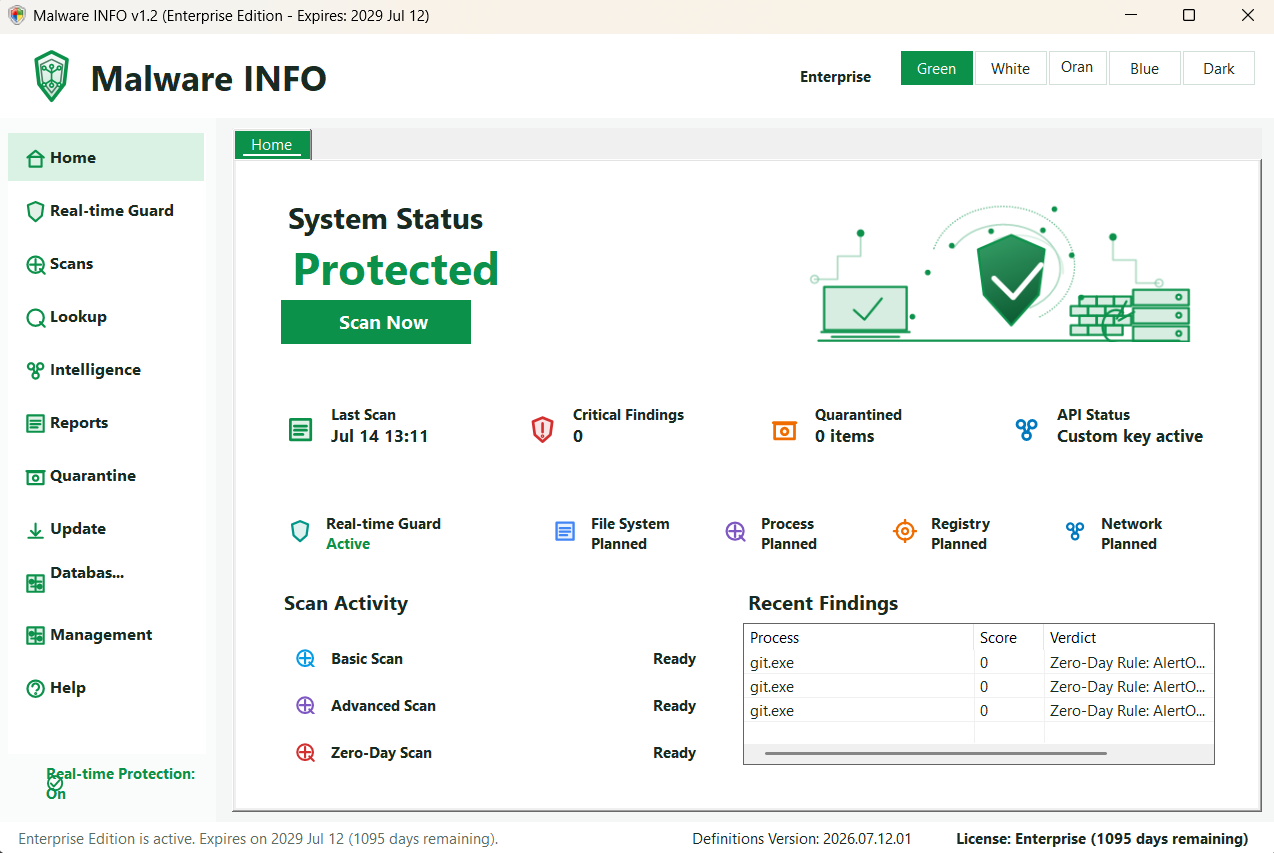
Malware INFO Command Center showing protection and product status
Malware INFO Command Center

Clear positioning

A focused analyst workstation, not an EDR/XDR replacement.

Malware INFO complements antivirus, EDR, XDR, and SIEM platforms. It is designed for fast internal incident response when those platforms do not expose enough detail about a file, process, persistence artifact, or memory region. It does not replace an organization's existing endpoint protection.

The product turns deep evidence into a guided workflow so a user with foundational cybersecurity knowledge can investigate and respond more effectively. The stronger the operator's knowledge and judgment, the more value Malware INFO can provide; the software supports, but never replaces, human decisions.

Working files, memory captures, Live Protection history, and API Trace evidence do not need to be copied to a Malware INFO analysis cloud. Network actions remain explicit and tied to the feature the analyst chooses.

Company and accountability

Malware INFO is developed by United Info-Sec Co., Ltd.

Established in 2017, United Info-Sec is a Myanmar cybersecurity and total IT solutions company. Its stated work includes cybersecurity services, IT infrastructure support, secure digital services, and cybersecurity knowledge and awareness.

A public Myanmar International TV report dated 2 September 2022 records a meeting between officials from United Info-Sec and the Union Minister for Information, including a presentation concerning the MTube video-sharing and live-streaming platform.

Nay Pyi Taw Office United Info-Sec Co., Ltd No.(14), (X-5), Thukha Taw Win Housing Zabu Thiri Township, Nay Pyi Taw +95-9886440022 [email protected]

Current product

One investigation surface, from indicator to handoff.

The in-app Help covers every area below. Availability depends on edition, Windows access, target eligibility, provider rights, and the quality of available evidence.

Command Center

Protection, scan, update, and license status at a glance

Review the current protection state, recent activity, product and signature status, edition access, and the next investigation workspace from one starting point.

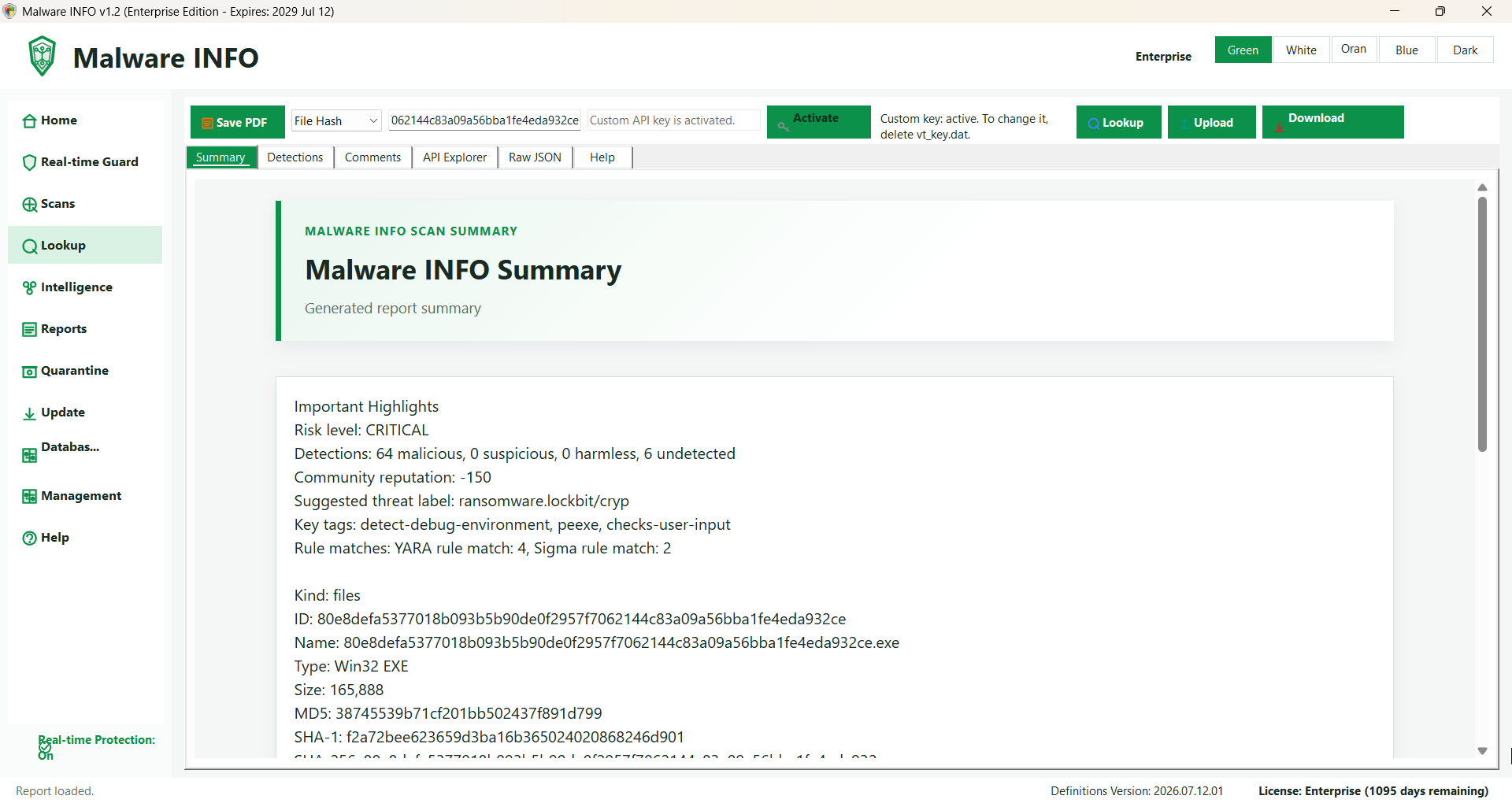
Threat Lookup

Hashes, files, URLs, domains, and IPs

Review summary, detections, comments, relationships, pivots, raw JSON, and license-aware VirusTotal API Explorer workflows.

Scan Studio

Hash, HEX, YARA, memory, and persistence

Combine known-bad hashes, signature rules, YARA, custom scopes, memory paths, persistence review, and analyst-controlled quarantine.

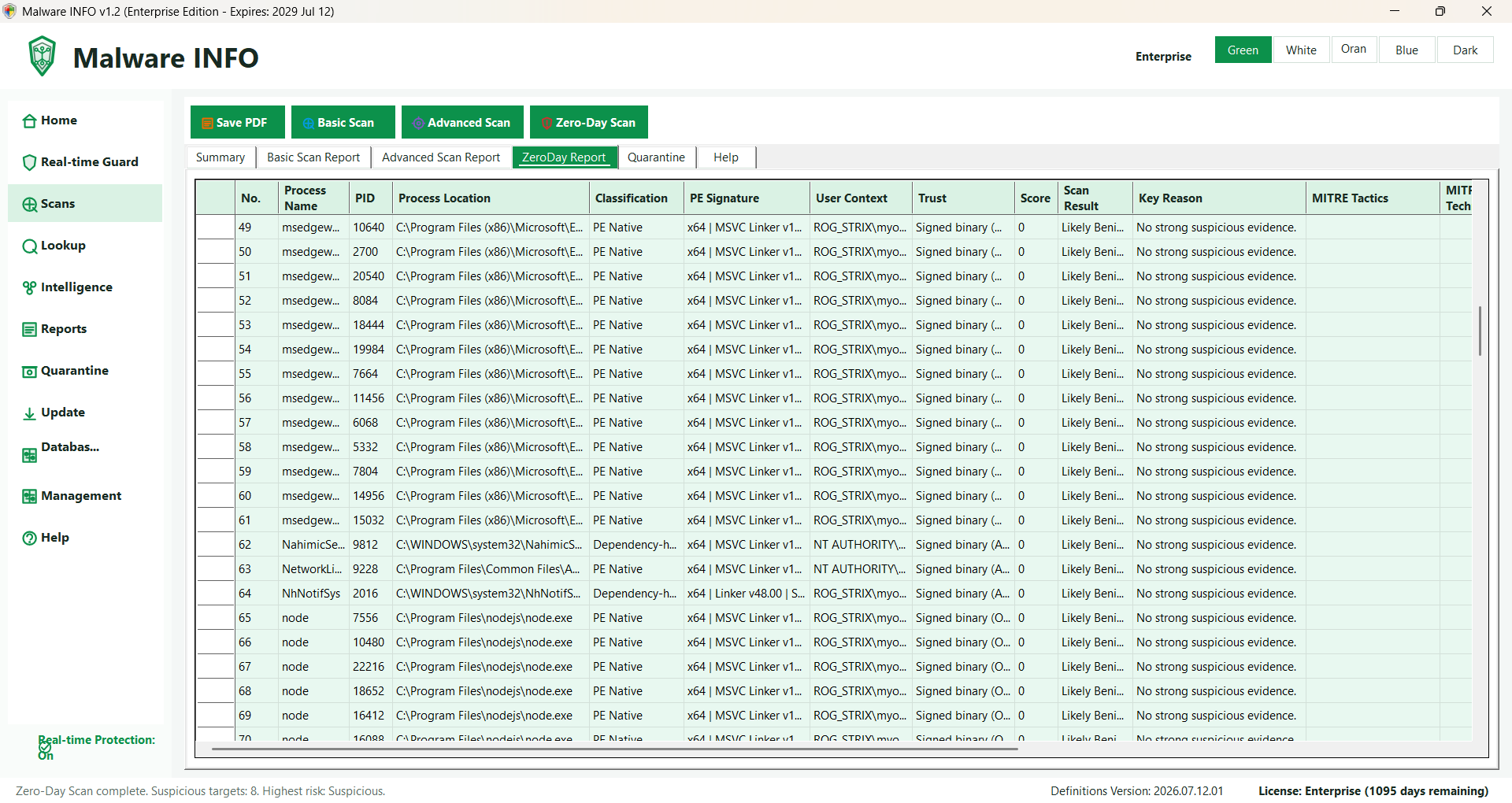
Zero-Day Analysis

Behavioral triage with careful verdicts

Score suspicious process, command-line, persistence, network, trust, and PE context without treating heuristic evidence as automatic proof.

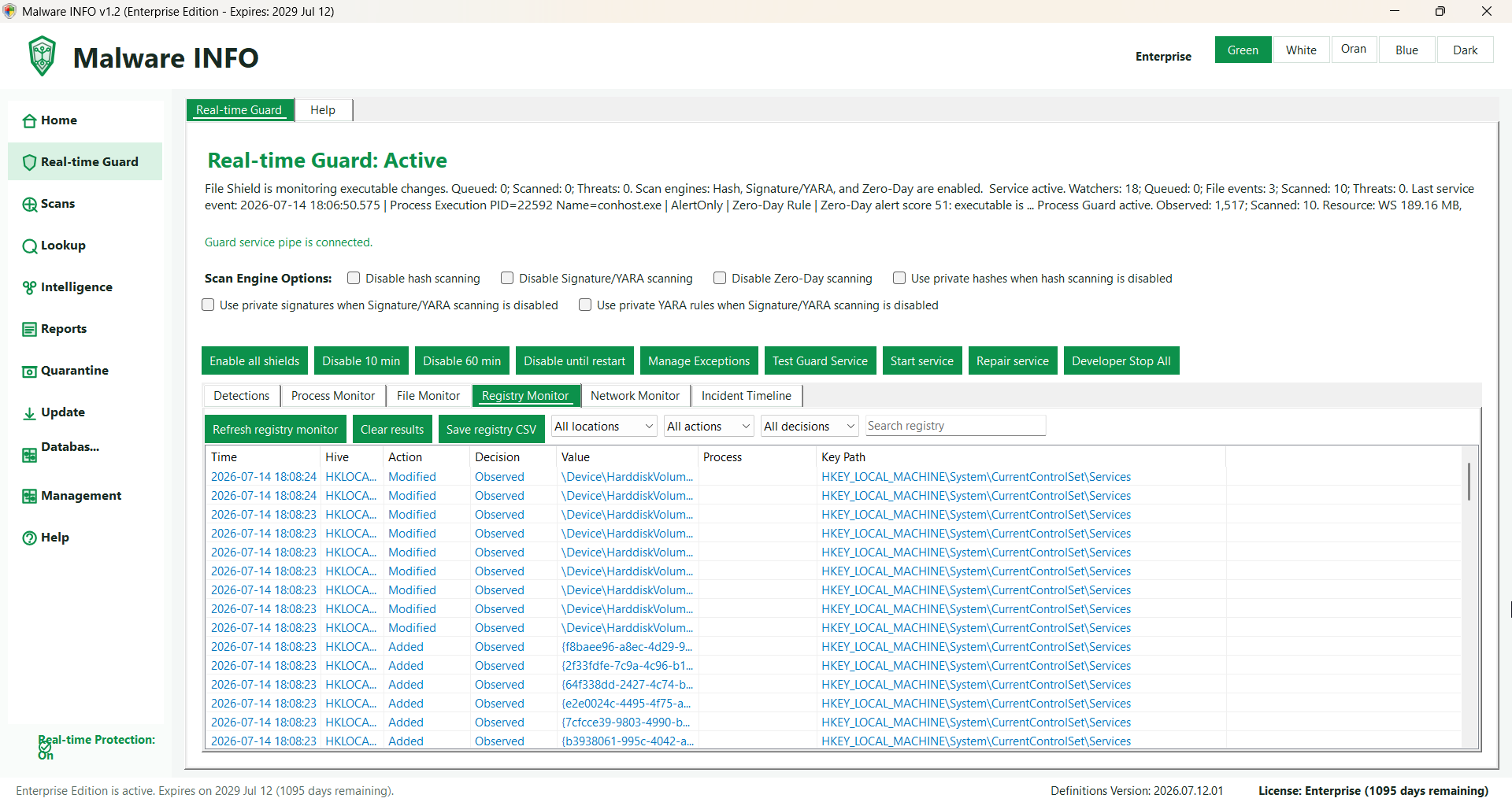
Protection Matrix

Live file, process, registry, network, memory, and timeline evidence

Use the background Guard Service, visible engine state, focused monitor tabs, incident timelines, live executable-memory transitions, and analyst-controlled evidence capture.

Threat context

Threat Intelligence, Threat Briefing, and Vulnerability Alerts

Hunt with query templates, read trusted-source news, prioritize NVD/CISA KEV/FIRST EPSS evidence, save items, and export reader views.

Professional

Automated Unpacker — Experimental controlled unpacking and protected evidence

Controlled Launch only · Not a sandbox · Recovered content is never executed automatically · AlertOnly

Enterprise

API Hook Trace — Enterprise Developer Preview, AlertOnly evidence

Per-session consent · Protected evidence · Partial and Recovery Required remain visible · AlertOnly

Official Free installer

Download Malware INFO Free 1.2.1

Public release

Download the official Windows x64 MSI and verify its SHA-256 before installation. Professional and Enterprise customers receive license-checked updates from inside Malware INFO.

Download MSI Download SHA-256 File File: MalwareInfo-Setup-1.2.1.0-x64.msi Size: 81,371,989 bytes SHA-256: 8f5bd78a5c81a5143887caafc576b765efb0097c598642f03f4af667c9bfb819 The installer is not digitally signed. Verify the exact SHA-256 and follow your organization's security policy. Need Professional or Enterprise?

Simple licensing

Choose the access your work requires.

Prices are shown in USD. First choose how the license will be used, then select the edition, device quantity, and one-, two-, or three-year term.

Free

Core investigation

$0no license required

  • Lookup and layered local scanning
  • Quarantine, reports, news, and CVE alerts
  • Manual installer upgrades
Enterprise

Private and deep analysis

$1001 device / 1 year

  • Administration, policy, and private packages
  • Ransomware, payload, and API analysis tools
  • License-checked Enterprise updates

Edition access

Complete current-build feature comparison.

A check means the feature is available in that edition. A dash means it is locked or unavailable. Help Center content is visible across editions so evaluators can understand paid capabilities without bypassing license controls.

Free

Core investigation

Threat Lookup, Rapid Scan, Deep Signature Scan, Quarantine Vault review, Reports & Evidence, Detection Library, Threat Briefing, Vulnerability Alerts, and Help Center.

Professional

Analyst workstation

Everything in Free plus Zero-Day Analysis, Threat Intelligence, licensed connectors, Dark Web Intelligence, custom feeds, Live Protection, and Ransomware Shield.

Enterprise

Private and deep analysis

Everything in Professional plus Administration, private packages, watchlists, App Lock, Security Connectors, Startup & Persistence Manager, selected-process Process Memory Capture and Payload & Memory Analyzer, and API/DLL trace workflows.

Recommended workflow

Escalate only as far as the evidence requires.

Start with non-invasive context, preserve identity and timing, and move to controlled live analysis only when authorization and an isolated lab are available.

  1. 01
    Preserve

    Record the original path, name, size, SHA-256, source, and case context.

  2. 02
    Look up

    Check reputation and relationships when policy permits sharing the indicator.

  3. 03
    Scan locally

    Use hash, HEX, YARA, memory, persistence, and custom-scope evidence.

  4. 04
    Correlate behavior

    Review Zero-Day Analysis signals and Live Protection file, registry, process, network, and memory history.

  5. 05
    Contain carefully

    Quarantine confirmed supported files; treat alert-only findings as review priorities.

  6. 06
    Escalate in a lab

    Use Payload/API workflows only for an authorized selected process in an isolated environment.

  7. 07
    Export and hand off

    Preserve reports, manifests, checksums, collection gaps, and analyst notes.

Security, privacy, and evidence limits

Readable evidence with explicit boundaries.

No automatic cloud-analysis upload

Evidence stays local unless the user deliberately exports or shares it. VirusTotal lookup sends the selected indicator; a complete file is sent only after the user explicitly chooses Upload to VirusTotal and confirms.

Verdict discipline

Observed and Allowed do not mean safe. AlertOnly means review is required. Detected means a configured confirmed source matched. Quarantined means supported file containment succeeded.

Not a sandbox boundary

Malware INFO does not make it safe to execute unknown code on a normal computer. It cannot guarantee interception of every exploit, driver, direct syscall, credential theft, destructive action, or evasion technique.

Guided before Deep

Guided API Trace is least invasive. Deep API Trace changes timing, may trigger anti-debug behavior, and has target limits. Use it only when exact supported API evidence is necessary and the lab accepts the impact.

Memory is evidence, not a verdict

An RX/RWX dump proves readable bytes existed at a recorded time. Correlate identity, protection changes, writer/thread origin, timeline, signer, network, file, and persistence context.

Current analyzer boundary

Payload & Memory Analyzer remains Enterprise-only: bounded review of supported EXE/DLL/SYS, MSI and legacy Office .doc files, supported .memimg/.dmp memory artifacts, and matching evidence correlation. Format, architecture and provenance limits apply. Crypto Lab provides offline config and key analysis for active Professional and Enterprise licenses; inputs and recovered bytes are never executed or uploaded.

Enterprise private intelligence

Keep organization-owned detection content under organizational control.

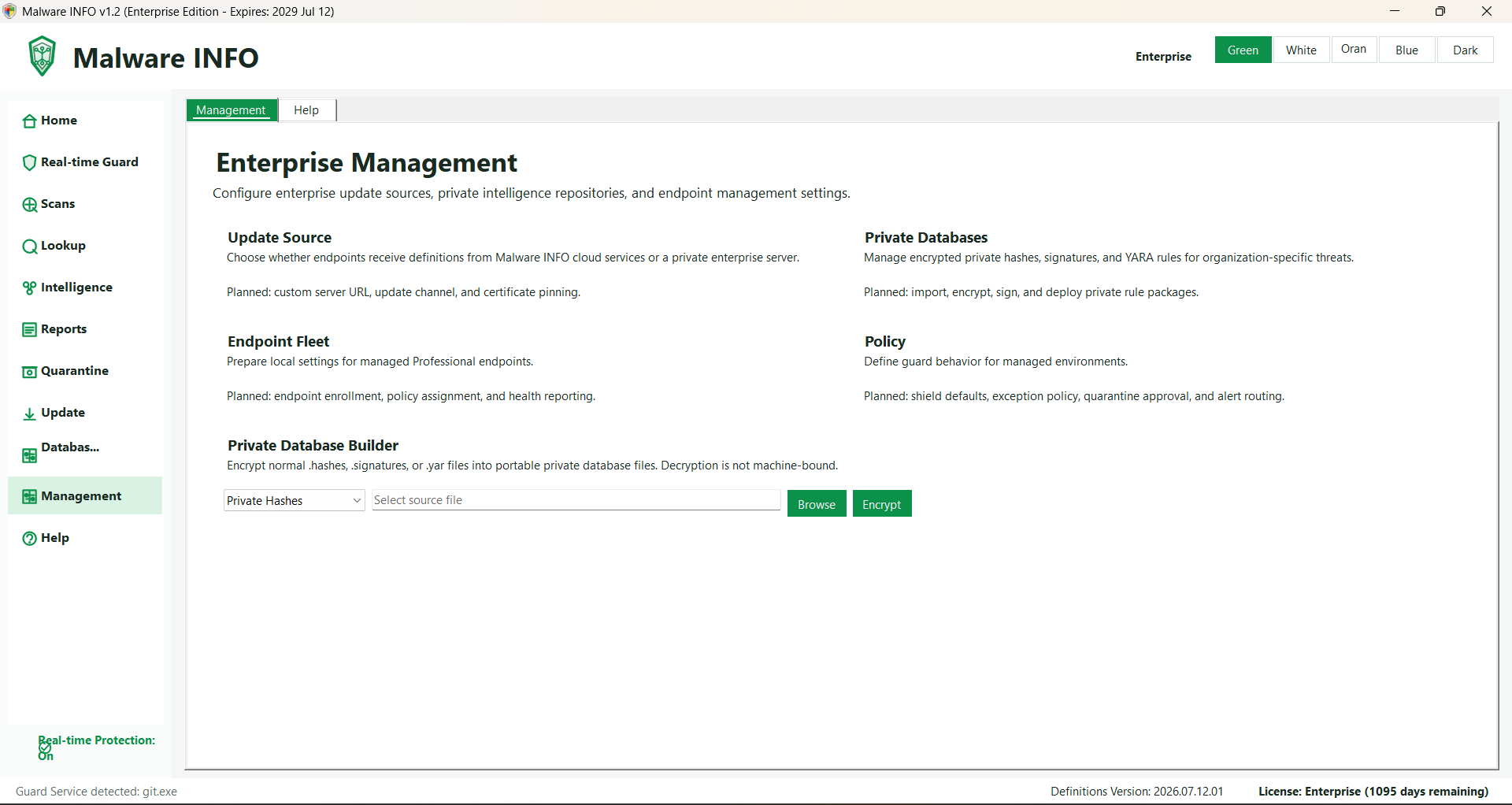
Administration supports private hashes, signatures, YARA rules, encrypted private packages, local update strategy, and organization-controlled policy workflows. Normal rule import, validation, cleanup, and *_to_fix review remain in Detection Library.

Malware INFO Administration workspace for private intelligence and local update strategy

Complete local Help Center

Guidance is built into the product.

Help Center includes product doctrine, Threat Lookup, Scan Studio, Threat Intelligence, Threat Briefing, Vulnerability Alerts, Dark Web Intelligence, Local Update, Administration, Detection Library, Reports & Evidence, Protection Matrix and Live Protection, Ransomware Shield, Security Connectors, Startup & Persistence Manager, Quarantine Vault, memory and API Trace workflows, DLL Behavior Trace, Advanced Analysis, the in-development Memory Forensics preview guide, a security glossary, safe-lab guidance, and the full FAQ below.

Automated Unpacker — Experimental controlled unpacking and protected evidence

API Hook Trace — Enterprise Developer Preview, AlertOnly evidence

Malware INFO Help Center showing the edition feature comparison

FAQ

Frequently asked questions and safe-lab guidance.

FAQ progress:0 of 6read on this browser.
Can I read Malware INFO Help in my language?

Yes. Malware INFO Help is currently available in 22 languages: Arabic, German, English, Spanish, French, Hindi, Indonesian, Italian, Japanese, Korean, Malay, Myanmar (Burmese), Dutch, Polish, Portuguese, Russian, Thai, Turkish, Ukrainian, Vietnamese, Chinese (Simplified), and Chinese (Traditional).

Which two Malware INFO features help analysts resolve incidents fastest, and why?

If I had to choose only two, I would name Live Protection and API Trace.

Live Protection helps analysts answer the first urgent incident question: what happened on this endpoint? It records current file, process, registry, network, ransomware, detection, and protection activity while the case is still fresh. That gives the analyst a fast timeline, affected paths, process IDs, actions, hashes, and related context instead of starting from memory or screenshots.

API Trace helps analysts answer the next question: what did the suspicious process actually do? Safe Trace gives low-impact correlated evidence, while Deep Trace can capture supported exact API boundaries, parameters, return values, behavior chains, memory snapshots, and a readable final report when the target and lab conditions are eligible. Together with Process Memory Capture and Payload & Memory Analyzer evidence, it shortens the path from 'this looks suspicious' to 'this is the behavior, this is the evidence, and this is the next safe action.'

Does Malware INFO replace antivirus, Endpoint Security, EDR, or XDR?

No. Malware INFO is an investigation and incident-analysis companion, not a replacement for antivirus, Endpoint Security, EDR, XDR, SIEM, or their prevention and response controls. It is designed to examine artifacts and evidence that an existing endpoint platform did not expose clearly enough, helping the user investigate suspicious files, processes, persistence, memory, and related incident activity in greater detail. Its guided workflows are intended to help users with foundational cybersecurity knowledge make better-informed decisions, but results still depend on evidence quality and human judgment. The stronger the operator's cybersecurity knowledge and analytical discipline, the more effectively Malware INFO can be used. Keep existing endpoint protection enabled and follow your organization's response policy.

Why can Windows 11 Smart App Control alert on or block Malware INFO?

Smart App Control is a Windows 11 protection feature that uses Microsoft's cloud-powered app intelligence and code-integrity checks to decide whether an application is trusted to run. Malware INFO has not yet been signed with a trusted code-signing certificate, so Smart App Control may treat a new or reputation-unknown release as untrusted and display an alert or block it. This does not by itself prove that Malware INFO is malicious. Until signed releases are available, obtain Malware INFO only from its official release channel and verify the published version and SHA-256. Do not weaken an organization's security policy merely to run an unverified file. United Info-Sec is working toward trusted code signing for future Malware INFO releases.

Can Malware INFO run in a Windows 7 malware sandbox?

Yes. Malware INFO has been tested successfully on 64-bit Windows 7 and can be used in legacy malware-sandbox and isolated lab workflows. On tested Windows 7 systems, it may temporarily use more memory during startup and can consume approximately 2 GB more RAM than on newer Windows versions before memory usage gradually settles. Because Windows 7 has reached end of life and Microsoft does not officially support .NET 10 on it, Malware INFO provides Windows 7 compatibility on a best-effort basis rather than the same support guarantee available on current Windows versions. Keep the Windows 7 environment isolated, provide sufficient RAM, take a snapshot before analysis, and do not use an end-of-life system as an ordinary Internet-connected endpoint.

Can I use Malware INFO on an x86 computer or Windows Server?

The current Malware INFO application, installer, and Guard Service are distributed for x64 Windows; there is no x86 edition of the main application at this time. The packaged x86 API Trace worker exists only to inspect eligible 32-bit target processes and does not make the main product compatible with a 32-bit PC. Malware INFO is intended for incident investigation on both supported x64 Windows client systems and eligible x64 Windows Server versions. The interactive application requires a compatible graphical desktop environment, the required Windows components and services, administrative approval, and compliance with organizational policy; a Server Core installation without the required interactive desktop cannot host the current UI directly. Normal server workloads can be investigated, while Windows critical or protected processes remain intentionally unavailable for invasive tracing or dumping to protect system stability.

Official downloads

Malware INFO Free 1.2.1 is available now.

Public release

Use only the official Malware INFO download channel and verify the published SHA-256 before installation. Paid update packages are delivered only after the app verifies an active Professional or Enterprise license, edition, and registered device.

Websitewww.malwareinfo.app Public installerMalwareInfo-Setup-1.2.1.0-x64.msi License managementportal.malwareinfo.app Paid updatesAvailable only inside the activated application

Contact

Questions about Malware INFO?

For product, documentation, release, or organizational evaluation questions, contact:

Purchase notice

Purchase with USDT or PayPal.

The automated payment gateway is not connected yet. Purchases are currently completed using Crypto (USDT) or PayPal instructions confirmed by the Malware INFO team. No payment has been taken by this website.